
Scorecard · Review
Grades the plan,
not just the P&L.
Every trade rebuilt from your real fills, and scored the way it happened. Expectancy first, win rate in the small print where it belongs, and the heat you took for the money you kept. It runs on your PC, and it doesn't flatter you.
Every trade, on its real candles
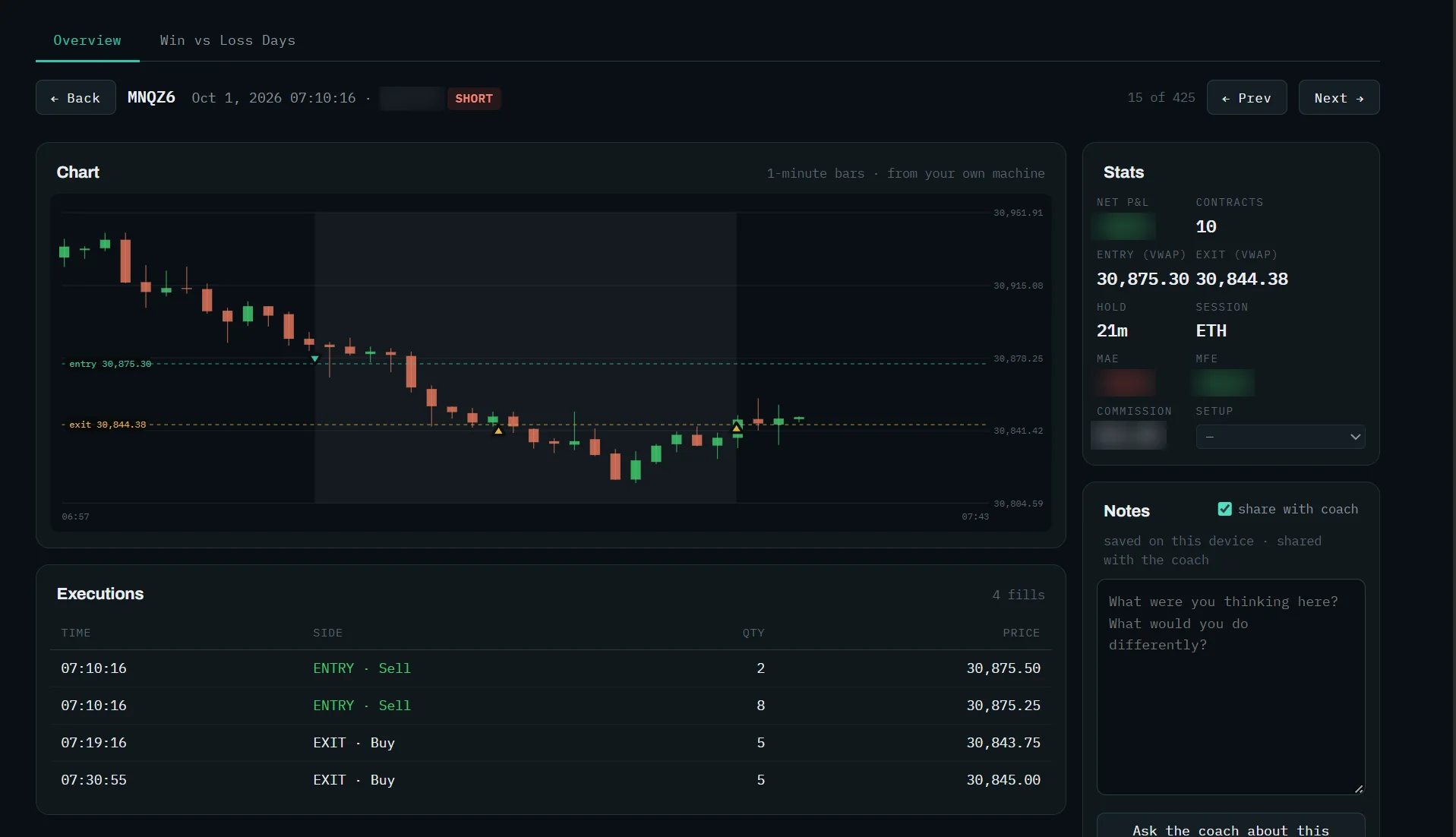
Open any trade and see it happen
The one-minute bars from your own machine, your entry and exit drawn on them, every fill, and the trade's stats: hold, session, MAE and MFE. Notes you write here can go to the coach.
Plan Grade
On the plan, or off it?
Download the day's plan and the Scorecard grades every trade against it. There's nothing to fill in: it reads the plan you had when you took the trade.
| 09:42 | Long | Idea · Absorption | +2.1R |
| 10:15 | Short | Idea · Rejection fade | +1.4R |
| 10:58 | Long | Early | −1.0R |
| 11:20 | Long | Level, no idea | −0.6R |
| 13:05 | Long | Wrong side | −1.0R |
| 14:31 | Short | Middle | +0.3R |
Missed · Long · Acceptance retest set up at 12:40. Not taken.
Grades
One grade per trade
A plan idea, at a plan level, early, at a level with no idea for your side, wrong side, the no-trade zone, or the middle. Copies on your other accounts count once.
Missed
The ideas you didn't take
Which of the plan's ideas set up during the session without you, read from the day's own one-minute bars.
Authors
Your plans, or someone else's
A plan can carry its author, so your own plans and a mentor's are graded separately.
Coach
Ask about the plan
The coach compares how you traded on the plan and off it. It's given the grades, never your price levels.
How it works
Your journal builds itself
With Caddie running, every fill is recorded on your own disk as it happens. One click opens the Scorecard on the accounts Caddie is watching.
Numbers
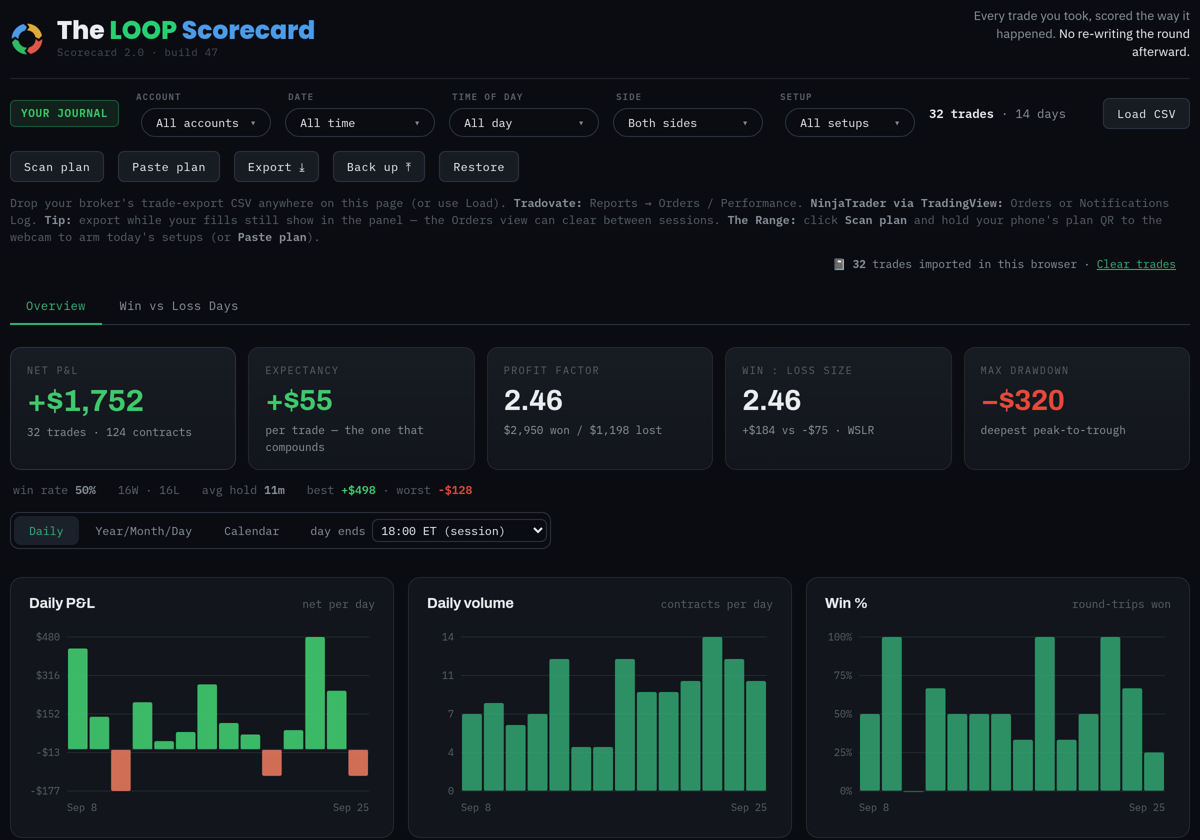
The ones that compound
Net P&L, expectancy, profit factor, win-to-loss size and max drawdown, in that order. A high win rate with small winners is a losing system with good feelings attached.
Sessions
The day is the session
A trade belongs to the session it was realized in, 18:00 to 17:00 ET, the way your firm counts it. Switch to midnight if you'd rather.
Heat
What each trade cost you to hold
MAE and MFE captured live on every trade: how far it went against you, how far it went your way, and how much of that move you kept.
Execution gap
What you did vs what the plan said
Set an ideal for a trade, or let it pre-fill from the best the trade offered, and tag why you left money on the table. The gap shows where the cost comes from.
Setups
Which ones actually pay
Tag trades with your setups, write each setup's rules down, and filter every number by setup, account, side and time of day.
Drill down
Year, month, day, trade
Calendar and month grids with week totals, every round-trip of a day, and each trade on its real candles with entry and exit marked.
The Flow
Your body, next to your trading
Connect WHOOP and the Scorecard lines your recovery up with how you traded, then says it in one sentence. Your live heart rate goes to Caddie while you trade.

Win vs loss days
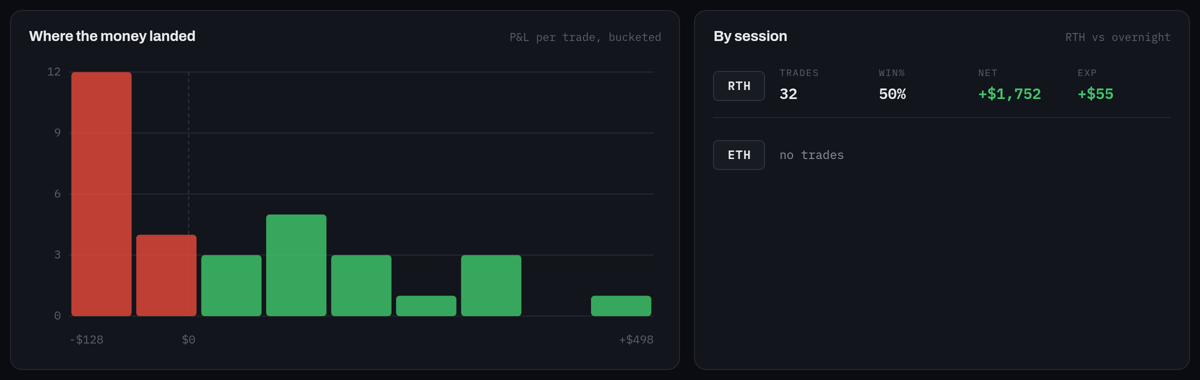
Where the money actually landed.
Winning days and losing days side by side on the same measures, streaks, and a histogram of every trade's result, so one outsized loss can't hide inside a good week.
It tells you when the record has a hole. A position that never closes can invent a trade or make one disappear. The Scorecard checks its own arithmetic against your broker's position and names the dates to export if fills are missing.
Ask your journal
A short write-up of your last session and your week, and a coach you can ask about your own trades: why was last week worse, am I overtrading after a loss, which setup is carrying me?
It's Claude Sonnet, made by Anthropic, and it comes with your subscription: no key to set up and no second bill. There's a monthly allowance; session summaries keep coming after coach questions pause.
It sees de-identified statistics: times, sides, sizes, P&L, hold times and your setup tags. Never your account numbers or your exact entry and exit prices. Privacy.
You asked Why was last week worse than the one before?
Short answer Not the entries. Your average winner was the same size; you took 11 more trades.
Where 8 of the extra trades came within five minutes of a stop, and those lost as a group.
Try One re-entry per level, and only after a new signal.
A real answer
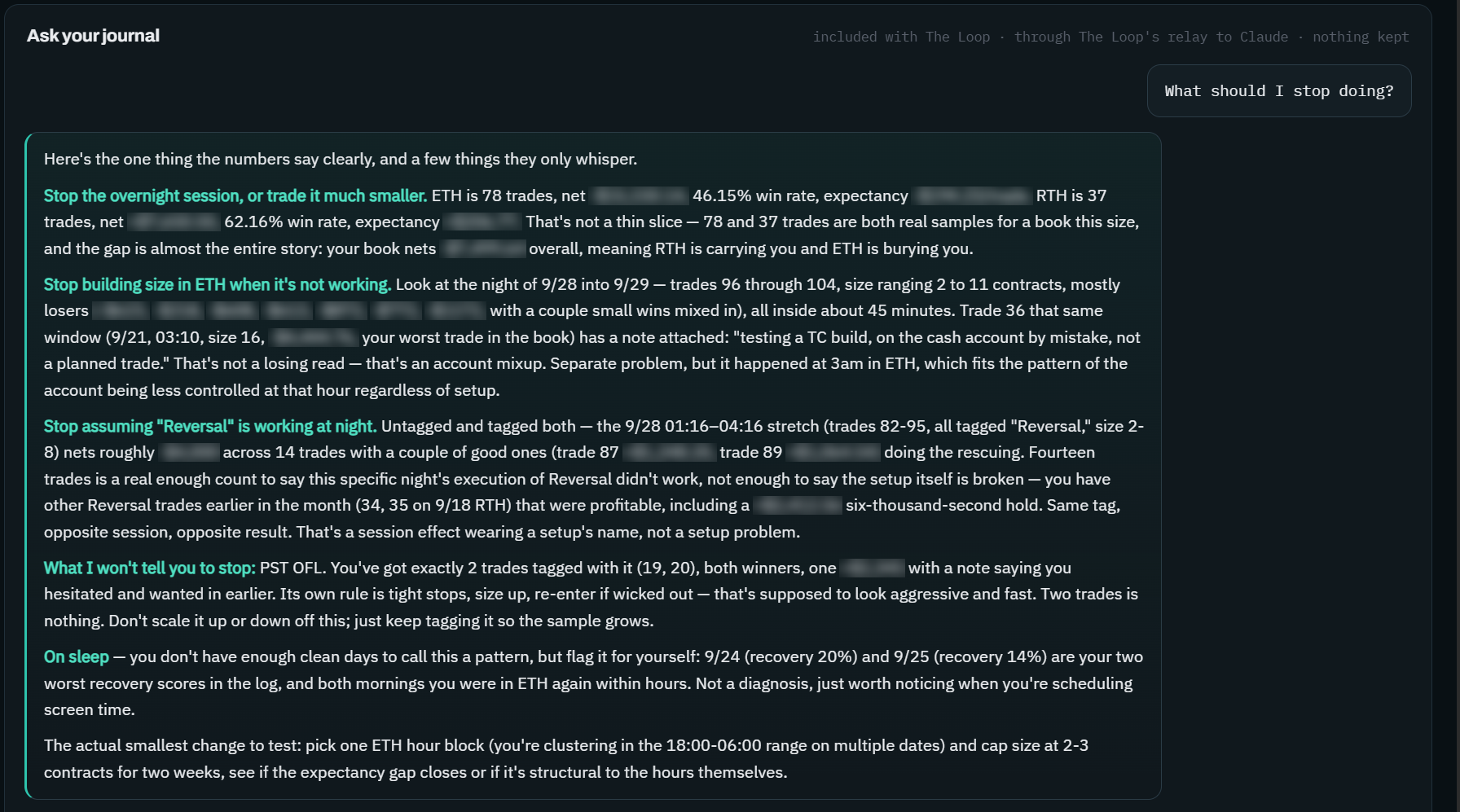
What should I stop doing?
Asked on a real journal: the coach splits the book by session, finds the hours doing the damage, and keeps a setup problem apart from a session effect, quoting the trader's own notes back to him.
Other platforms
Drop a file in, get the truth out
Trading somewhere else too? Drop your broker's export anywhere on the page. The Scorecard works out the shape of the file rather than demanding a particular one.
| From | What to export |
|---|---|
| Tradovate | Reports → Orders, or Performance |
| NinjaTrader | Orders, Executions, or the Notifications log |
| Sierra Chart | The Trade Activity Log, as Sierra saves it |
| Anything else | Comma, tab or semicolon separated. If a column isn't recognized, you match it up by hand. |
Exports don't carry heat, so MAE and MFE come from Caddie's live recording on NinjaTrader. Everything else works from a file.
Local
It stays on your PC
A single file on your own machine. No account to create, and no book of your trades on somebody else's server.
Backup
Yours to keep
Export to CSV, back the whole journal up to one file, and restore it on another PC.
Plans
Your plan, graded
Download the day's plan and every trade is graded against it, with the ideas you missed. See Plan Grade above.
The Flow
Your body next to your trading
With WHOOP connected, a panel lines your recovery and sleep up with how you traded. See The Flow.
Grade your last month.
Open it from Caddie, or drop in an export from wherever you trade. Help is in the Discord.