
Caddie · Rules
Every account’s rules,
watched for you.
The floor, the daily loss, the consistency rule and the payout, for every account in one panel, in the color you can read without thinking. And your own limits, set while you're calm, that stop new entries when you hit them.
What it watches
Four rules, no arithmetic
Caddie reads each account and its firm's plan together, so what you see is your real headroom, not a generic risk widget.
This session +$180 of $1,000 · trades 2/4
Consistency 34% of 50% · $1,170 to target (~2 compliant days)
give-back · kept 62% of your best
Room to the floor
How much is between you and the trailing drawdown that ends the account, in dollars and in days of your own stop. On intraday accounts it counts the trade you're in, because that's how your firm measures it.
Loss left today
What's left of the day, counted down live, so a bad morning can't be rounded off in your head.
Consistency
Firms cap how much of your profit one day can be. Caddie shows where you sit against that limit and exactly how much more you need for your best day to be compliant.
Passing or Payout
Evaluations read Passing, funded accounts read Payout, and on a funded account it measures what you can actually withdraw after the firm's buffer, not what you've made.
Firm plans
About 100 plans built in
Pick the firm and plan, and the size, max loss, target and consistency fill in. Auto-profile can read the plan from the account name. Anything else, type in.
Cash accounts
Your own money, first-class
Trading your own account? Pick “my own account, my own rules”, type what you risk per trade, and Caddie derives a daily stop and a max loss from it.
No borrowed numbers
An account with no plan says so
Caddie never fills a blank with another account's figures. An account without a plan reads “no plan” until you give it one.
Payouts
Took a payout
Press it after the money leaves and consistency counts from that day, the way your firm restarts it. Pressed the wrong one? Undo.
Match firm
Agree with your dashboard
Re-anchor the session so Caddie's numbers line up with your firm's, per account or across the fleet.
Streaming
Stealth
Hide account names, or names and dollar figures, on the panel and in the log.
What locks you out
Limits you set while you're calm.
A lockout you can talk yourself out of isn't a lockout. Caddie's are switches you set, and when one fires, Trade Commander and Fan-Out take no new entries on that account. Exits always fire.
Your firm's own limits are reported, not enforced. The firm's daily loss, max loss and drawdown floor turn the account red, but they don't lock it. Don't rely on the software to stop you at them.
Your own daily stop
The loss that ends your day, whatever the firm allows. Hit it and the account locks for the session. It can't be unlocked.
A trade limit
Four trades a session by default. The row counts them: trades 3/4.
A cooldown after losses
Two losers in a row and there are no entries for 15 minutes. It clears by itself, and a win resets the count.
Bank at target
Optional: lock the account once the day's number is made, so a good day stays a good day.
Test lock
Prove the lockout works on your setup before it matters, without losing a cent.
Glow
Account health at the point of action
Trade Commander's panel takes Caddie's color for the account it's trading: green, gold when you're close, red when you're locked or breached.
Journal
Every fill, written as it happens
Caddie records each fill on your own disk for the Scorecard. No upload, no sync, no account.
Scorecard
One click to your review
Open Scorecard opens your journal already ticked to the accounts Caddie is watching.
The Flow
Your heart rate on the panel
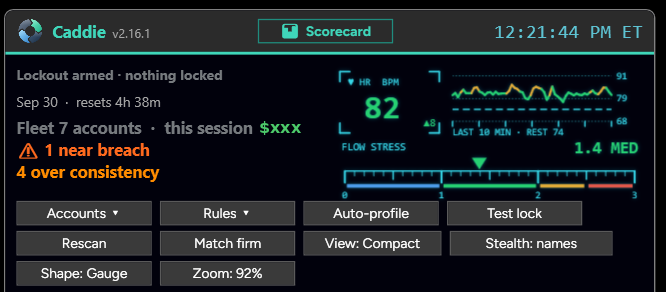
With a heart-rate strap connected, Caddie shows your live heart rate and a Flow Stress meter beside the status lines.
Set it up once, then trade.
Setting up each account from its plan takes a few minutes. The walkthrough and the firm list are in the Discord.