
Fan-Out · Copy
One trade.
The whole stack.
Fan-Out copies your trade to your other accounts at the same moment, from inside Trade Commander. No cloud service in the middle: each copy is sized to its own account and carries its own stop at the broker.
Before you use it on a funded account
Fan-Out is off by default and comes back disarmed after a reload. Start on Sim, or on an eval you can afford to reset, and watch your Orders tab as well as the panel: the failure to look for isn't a crash, it's a copy quietly out of step with the master.
Every prop firm has its own rules on copying trades between accounts and on reversing. Check yours before you run it.
The cockpit
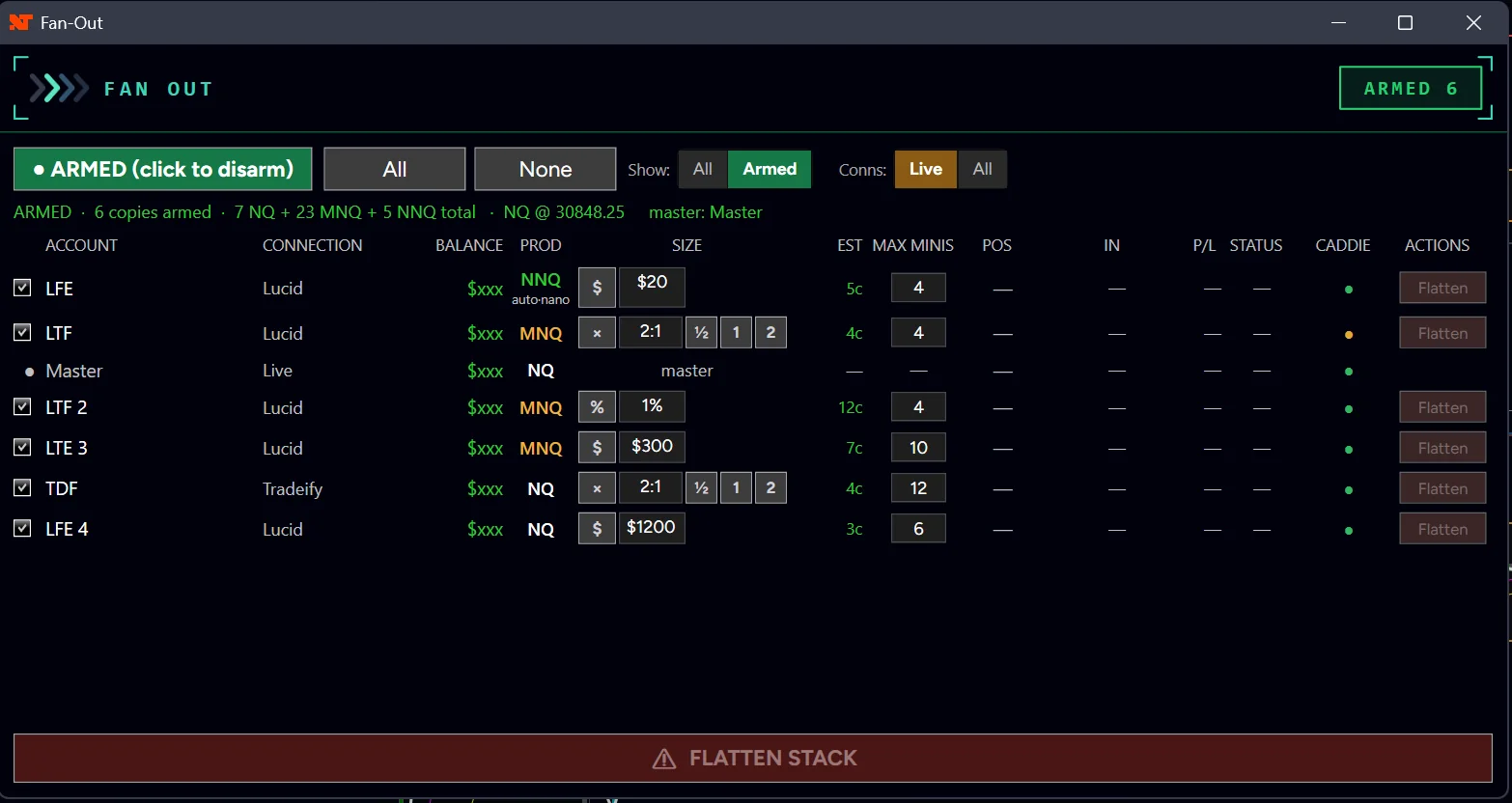
Every copy on one screen
One row per account: its connection, the contract it will trade, how it's sized, what it would send right now, its firm's contract cap and its Caddie light. The header adds up each contract on its own, NQ, MNQ and NNQ.
How it works
Every other copier watches. This one fires.
Cloud copiers watch your master account and race to mirror it across the internet. Fan-Out runs inside NinjaTrader on your PC, so the copies leave with the master.
In-process
No service in the middle
If NinjaTrader is up and your accounts are connected, Fan-Out is working. Nothing else has to be having a good day.
Protected
A stop on every copy
Each copy carries its own broker-side bracket. If a firm rejects a copy's stop, Fan-Out tries to restore it three times, then tells you in capitals to flatten that account.
Sizing
Sized per account
% of that account's balance, a fixed dollar risk, or ½, 1 or 2 times the leader. A $50k eval and a $150k funded account don't take the same size.
Contracts
Mini or micro, per account
Each account picks NQ or MNQ against its own balance, so the risk lines up rather than the contract count. Pin one if you want it fixed.
Firm limits
MAX MINIS per copy
Type your firm's contract limit. The copy's whole position is capped, and an add is trimmed or skipped once it's full. The master is never capped.
Caddie-aware
Locked accounts are skipped
An account Caddie has locked isn't traded. The copier is not a back door around your daily stop.
Arming and firing
Two clicks to arm. Then trade normally.
The first click shows exactly what you're about to commit, CONFIRM: 10 ACCTS · 20c NQ. The second arms it, and it stays armed until you say otherwise.
The whole trade fans, not just the entry. Scale out and the copies trim in proportion. Add and they add. Reverse and the stack flips as one block. Exit and they exit.
Moving your stop moves theirs by the same distance, not to your price, so a copy that filled a tick worse keeps the risk it was sized for.
Resting entries can be mirrored. Each copy rests its own order at your trigger, so the stack breaks out with you instead of chasing you.
Knowing what happened
It tells you when a copy is missing.
The quiet failure is believing a trade is on eight accounts when it's on seven. When a fan doesn't reach everything you armed, the bar turns amber and says ⚠ 6 OF 8, and every skipped account is named with its reason.
Three seconds after your fill it reports how well the copies tracked you, in ticks, so an NQ master with MNQ copies still compares.
A reload picks your copies back up, positions and resting entries alike, and comes back disarmed on purpose. Copies it can't attribute show red: ⚠ 2 LIVE. Flatten Stack closes every account at once, in about a second.
The status light
Read it from across the desk
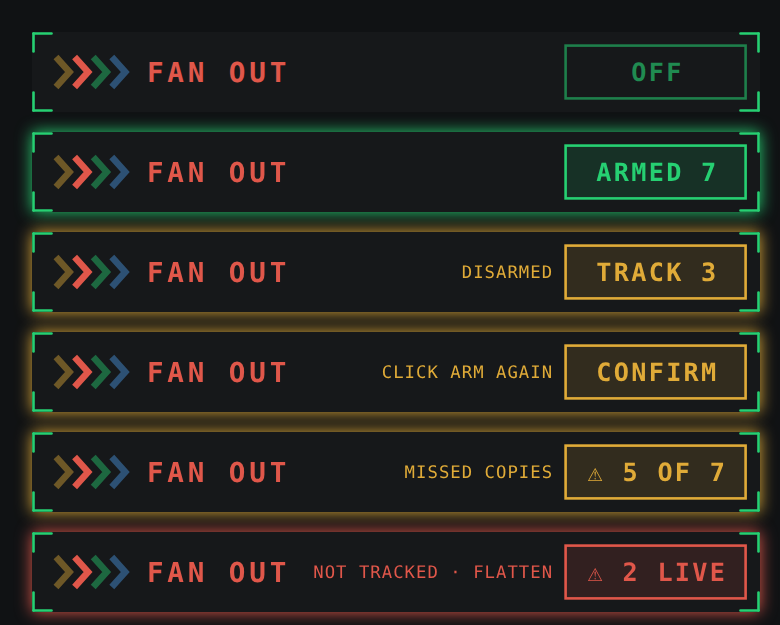
Color appears only when something needs you.
| Box | Means |
|---|---|
OFF | Disarmed. Trades stay on the master. |
ARMED 7 | Seven copies follow your next trade. |
TRACK 3 | Three copies picked back up after a reload and managed. The next trade won't fan until you arm. |
CONFIRM | You clicked arm once. Click again to commit. |
⚠ 5 OF 7 | The last fire reached five of seven armed copies. |
⚠ 2 LIVE | Copies live at the broker that Trade Commander can't reach. Flatten Stack. |
Every other copier watches your master account and races to mirror it. Trade Commander is your master account.
The Loop
Practice it on Sim.
Know where Flatten Stack is before you need it. The build and the help are in the Discord.